
How to Check Your Trade History
Learn how to check your Trade History on PLUBIT Exchange. This step-by-step guide explains how to view completed trades, review order details, track trading fees, and manage your trading records.
By plubit support · August 5, 2026
Main Takeaways
- Trade History displays all completed cryptocurrency trades.
- You can review execution prices, quantities, fees, and timestamps.
- Use filters to quickly locate specific transactions.
- Trade History is different from Order History and Open Orders.
- Regularly reviewing your Trade History can help improve your trading decisions.
Keeping track of your trading activity is an important part of managing your cryptocurrency portfolio. PLUBIT Exchange provides a Trade History feature that allows you to review all completed trades, monitor your trading performance, and verify transaction details.
Whether you're checking the execution price of a recent trade or reviewing your trading fees, the Trade History page gives you a complete record of your Spot Trading activity.
In this guide, you'll learn how to access your Trade History and understand the information displayed for each transaction.
What Is Trade History?
Trade History is a record of all completed trades executed on your PLUBIT Exchange account.
Every successful buy or sell order is automatically saved, allowing you to review your trading activity at any time.
Trade History helps you:
- Track completed trades.
- Verify execution prices.
- Review trading fees.
- Monitor your trading performance.
- Keep accurate trading records.
Unlike Open Orders, which display pending orders, Trade History only shows trades that have already been completed.
Before You Start
Before accessing your Trade History, make sure you:
- Have a registered PLUBIT account.
- Have completed at least one trade.
- Are logged in to your account.
How to View Your Trade History
Step 1
Log in to your PLUBIT account.
Step 2
Navigate to Orders from the main menu.
Step 3
Select Trade History.
You will see a list of your completed Spot Trading transactions.
Step 4
Use the available filters to find specific trades.
Depending on the available options, you may filter by:
- Trading Pair
- Buy or Sell
- Date Range
- Order Type
- Trading Market
Filtering helps you locate transactions more quickly.
Step 5
Select a specific trade to view additional details, if available.
Understanding Trade History Information
Each completed trade typically includes the following information.
Trading Pair
Shows which assets were traded.
Example:
BTC/USDT
Order Type
Displays the type of order used.
Examples include:
- Market Order
- Limit Order
Buy or Sell
Indicates whether the transaction was a purchase or a sale.
Execution Price
Shows the price at which the order was executed.
Quantity
Displays the amount of cryptocurrency bought or sold.
Total Value
Shows the total value of the completed transaction.
Trading Fee
Displays the trading fee charged for the completed trade.
Execution Time
Shows the exact date and time when the trade was completed.
Why Should You Review Your Trade History?
Regularly checking your Trade History helps you:
- Verify completed transactions.
- Monitor trading performance.
- Confirm execution prices.
- Review trading costs.
- Identify previous trading decisions.
It also makes it easier to manage your cryptocurrency portfolio over time.
Difference Between Trade History and Order History
Although they sound similar, these two sections serve different purposes.
Trade HistoryOrder History
Shows completed trades
Shows all submitted orders
Includes executed buy and sell transactions
Includes open, canceled, expired, and completed orders
Displays execution details
Displays order status and history
Trade History focuses only on trades that have actually been executed.
Tips for Managing Your Trading Records
To stay organized:
- Review your Trade History regularly.
- Compare execution prices with current market prices.
- Monitor your trading fees over time.
- Keep personal records if needed for tax or accounting purposes.
- Use filters to quickly locate previous transactions.
Frequently Asked Questions (FAQ)
1. Why can't I see any trades?
Trade History only displays completed trades.
If you haven't completed any trades yet, the page will remain empty.
2. What's the difference between Trade History and Open Orders?
Trade History shows completed transactions.
Open Orders displays orders that are still waiting to be executed.
3. Can I see canceled orders in Trade History?
No.
Canceled orders are typically shown in Order History, not Trade History.
4. Can I review my trading fees?
Yes.
Each completed trade includes the trading fee charged for that transaction.
5. Can I search for a specific trade?
Yes.
Use the available filters, such as trading pair or date range, to locate specific transactions more efficiently.
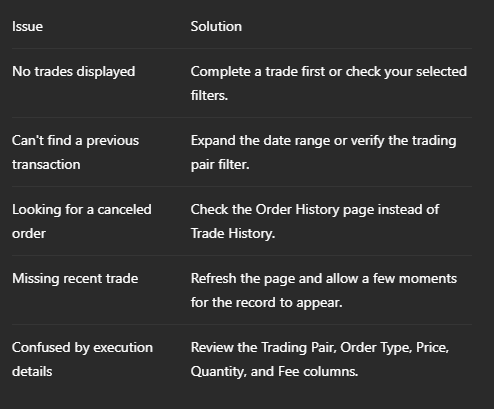
Common Issues
Final Thoughts
Trade History is an essential feature for reviewing your completed cryptocurrency trades on PLUBIT Exchange. By understanding the information provided, you can monitor your trading activity, verify execution details, and make more informed decisions in the future.
Regularly reviewing your Trade History also helps you stay organized and maintain a clear record of your trading performance.